
How does online parking work in Hungary?
No change, can't find a meter, or don't want to walk back to your car? With Parking Hungary you can start parking in minutes — pay by bank card in HUF or EUR, no SMS, no parking meter, from anywhere.
What is online parking?
Mobile parking — also known as web or online parking — means buying your permit online, without SMS, by bank card, on your phone or computer. You enter the zone and licence plate, pay, and the permit is immediately active. Enforcement officers check validity digitally through the official system: no paper ticket, no sticker, no coins needed. With Parking Hungary you can start parking directly from your browser — no app required — in many Hungarian cities where paid public parking applies. If you prefer, you can also download the iOS or Android app for quick access at any time.
Online parking, SMS, or parking meter?
Online parking can be started on a simple interface, with GPS assistance to help identify the correct parking zone — no need to search around. Parking is paid by bank card, can be extended remotely, and stopped early if needed. With SMS parking you have to get the exact format right and watch out for carrier fees; with a meter you pay on the spot, usually in cash.
What does this look like in practice?
You arrive in Budapest, you don't feel like hunting for a meter, and you've got no change. You grab your phone, open the Parking Hungary website or app, GPS helps identify the zone, you enter your licence plate, pay by card, and your parking is active. If your meeting finishes early, you can stop the session from the site and only the proportional amount for the time actually used will be charged.
How to buy an online parking permit in Hungary — step by step
Below we walk you through the process of buying an online parking permit on the Parking Hungary website and mobile app.
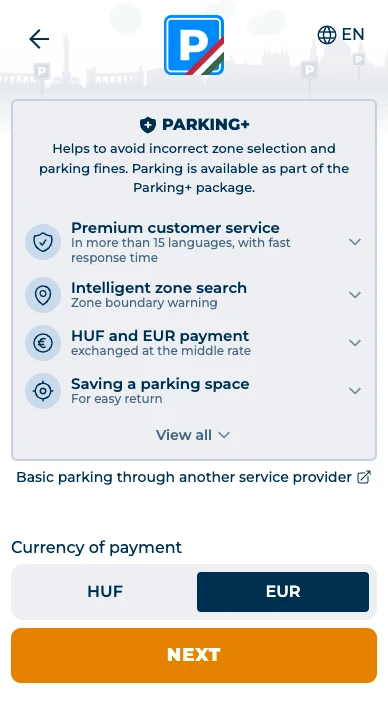
Choose your currency and learn about the PARKING+ package
When you open the page, you can select your payment currency (HUF or EUR). You'll also see what's included in the PARKING+ package that comes built into every parking session: GPS-based automatic zone detection, expiry notification, early stop, and parking spot saving.
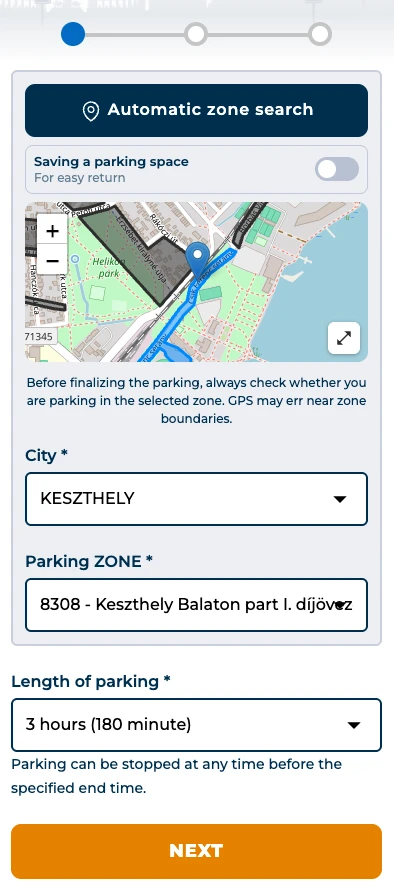
Select city and parking zone
Choose the city, then enter the parking zone. GPS can help identify your current zone, but always verify the zone on the street sign before paying. If you prefer to enter it manually, the zone number is shown on the roadside sign. Then set your desired parking duration. If you finish early, no problem: you can stop the session at any time and only pay for the time you actually used.
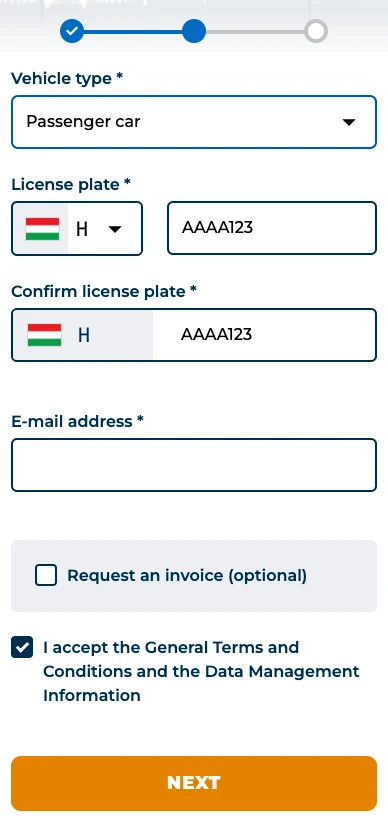
Enter your vehicle details
Enter the vehicle type (car, motorcycle, etc.), licence plate, and your email address. If you need an invoice, you can request one here — it will be generated automatically at the end of the session and sent to you by email.
Summary and review
Before paying, a summary page lets you review all the details you entered: zone, licence plate, duration, and amount due. If everything looks correct, proceed to payment.
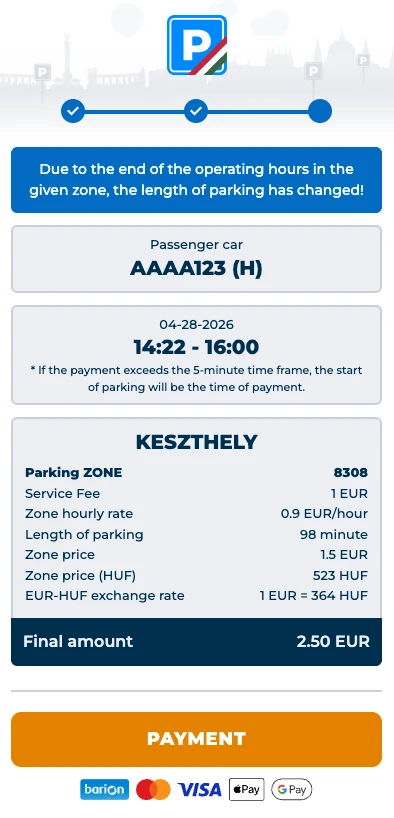
Secure online payment
Payment is processed through Barion's secure payment system. You can pay with a standard bank card, Google Pay, or Apple Pay, in HUF or EUR. The amount is pre-authorised when parking starts; the actual charge is taken at the end of the session.
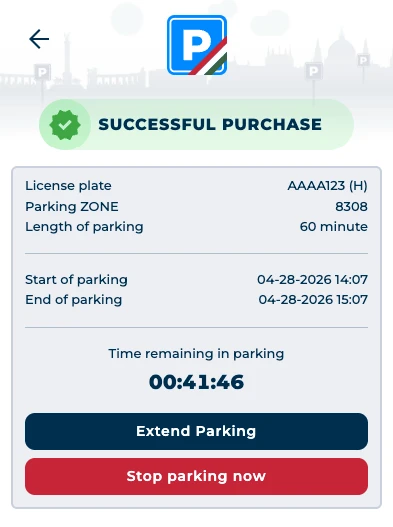
Parking active: confirmation and countdown
After successful payment, the confirmation page shows your parking details and remaining time. We also send an instant email confirmation — you can use it at any time to check your details or stop the session early.
Notification before expiry
You'll receive an email notification before your parking expires. If you need more time, you can extend with a single click from the email or from the website — without going back to your car.
Receipt and invoice by email
At the end of your session you'll receive a receipt by email — or an invoice, if you requested one.
How is parking enforcement handled?
Enforcement officers check parking validity electronically, by licence plate. If an officer finds no valid session for a given plate and zone, they may place a penalty notice on the vehicle. Fines are always handled by the operator of the parking zone in question, so in the event of a dispute you should contact them directly.
Why park online in Hungary?
Online parking with us is faster and more convenient than SMS or cash alternatives. Every session automatically includes the built-in PARKING+ package:


Online parking by city
Parking Hungary is available in many Hungarian cities where paid public parking applies. Click a city for detailed information on parking zones and rates.
What to check before starting your parking session
Double-check your licence plate
A parking permit is valid only for the licence plate you enter. A typo means the enforcement officer will find no valid permit. Always review the details on the summary page before you pay.
Check the zone
Entering the wrong zone is one of the most common reasons for a parking fine. GPS can help with identification, but always confirm the zone number on the street sign.
Don't ignore the expiry notification
An expired permit is invalid, even if you've only gone a few minutes over. The email reminder gives you plenty of warning, so you can extend with a single click.
If payment fails, your session does not start
A parking permit only becomes active after a successful transaction. If payment fails, check your card details or choose a different payment method.
F.A.Q
How does online parking work in Hungary?
During online parking, you select the city and the parking zone, enter the license plate number and the parking duration, then pay for the parking ticket using a bank card.
After a successful payment, the parking starts immediately, and the permit is linked to the license plate. There is no need for a parking meter, cash, or SMS; the entire process can be completed online in a few minutes.
How do I know if I’m in a paid parking zone in Hungary?
In Hungary, paid parking zones are generally marked by information signs. These indicate the zone code, the hours when payment is required, and in many cases the parking fee as well.
On the Parking Hungary website, you can check parking options by city and zone, then purchase a parking ticket online with a bank card. Before purchasing, it is always advisable to compare the information shown on the website with the on-site signs.
How much does on-street parking cost in Hungary?
The fee for on-street parking in Hungary varies by city and parking zone. The exact hourly rate is always determined by the specific zone, so there may be different fees even within the same city.
On the Parking Hungary website, you can select the city and zone, check the current rates, and then purchase a parking ticket online with a bank card. It is also advisable to verify the information on the signs and machines on site before making a purchase.
When is parking free in Hungary?
Free parking periods in Hungary may vary by city and by zone. In some locations, you do not have to pay in the evening, on weekends, or on public holidays, while elsewhere different rules may apply.
Therefore, always check the information applicable to the specific zone before parking. On the Parking Hungary website, you can look up information by city and zone, but you should also take into account the rules displayed on the on-site signs.
Where can one buy a parking ticket in Hungary?
Parking tickets in Hungary can be purchased in several ways: at a parking machine, via a mobile app, by SMS, or through an online website.
With Parking Hungary, you can buy an online parking ticket with a bank card without registration. This is particularly useful if you don’t have small change, can’t find a parking machine, or don’t want to use SMS parking.
How can I buy a parking ticket in Hungary without cash?
You can buy a parking ticket without cash using a bank card, a mobile app, via SMS, or through online payment.
On the Parking Hungary website, after selecting your parking, you can pay by bank card without registration. After payment, the parking ticket details are available online, so you do not need to print a paper ticket or place it in the car.
How long is the parking ticket valid?
The parking ticket is valid for the specified duration. Parking begins immediately after payment and entitles you to park until the end of the selected time period.
Parking can be stopped at any time, even before the expiration time. In such cases, only the time actually used will be charged.
How can I avoid a parking fine in Hungary?
To avoid a parking fine, always check whether you are parked in a paid parking zone, which zone code applies to the given location, and how long the payment period lasts.
When purchasing a parking ticket online, it is especially important to enter the license plate number and the zone accurately. On the Parking Hungary website, you can start parking quickly, but always check the details before purchasing, because an incorrect license plate number or wrong zone can lead to a fine.
Is registration required to purchase an online parking ticket?
No, on the Parking Hungary website you can also purchase an online parking ticket without registration.
To make a purchase, you only need to provide the required information, such as the city, the parking zone, the license plate number, and the duration of parking. Payment is made with a bank card, and the parking starts automatically after a successful transaction.
This is a particularly convenient solution for tourists and occasional users, as there is no need to create an account or install an app.
Is it necessary to place a paper parking ticket in the car after purchasing online?
No, after purchasing a parking ticket online, you do not need to place a paper ticket in the car.
The parking authorization is linked to the specified license plate number, so checks are carried out electronically. The parking details can also be reviewed online after purchase.
It is important that you provide the license plate number, the parking zone, and the parking duration accurately during the purchase, as checks are based on these.
Can I request an invoice for parking?
An invoice can be requested for parking.
During the purchase process, you can provide billing details, and the invoice will be issued based on the information provided. The invoice is available electronically after the purchase.
Billing is available for foreign users as well, so the service can also be used for company or business parking.
Can I also buy a parking ticket with a foreign license plate?
Yes, you can also purchase a parking ticket on the Parking Hungary website using a foreign license plate number.
During the purchase, you can enter the license plate number including the country code, so the parking authorization is linked precisely to the vehicle. No Hungarian format or separate registration is required.
It is important to enter the license plate number accurately, as verification is based on it.
Can I also pay with a foreign bank card?
Yes, payment with foreign bank cards is also supported.
In the Parking Hungary system, card payments are available, including international cards. Payment can also be made in euros, which the system converts at the mid-market exchange rate.
Payment is fast and secure, with no registration required, making it easy for tourists to use.